Unification of Your Portal Login Credentials: A New Step in Your Live Objects Experience
We will soon enable users with multiple login credentials for the Live Objects portal to merge them, providing a smoother and more secure navigation on our platform.
Cet article est également disponible en Français
At Orange, we are committed to simplifying and enhancing your user experience. As part of this effort, users with multiple login credentials for the liveobjects.orange-business.com portal can now unify them to enable smoother and more secure navigation on our platform. This evolution aligns with our goal to make your interactions with Live Objects even more straightforward and efficient. It will also facilitate the broader adoption of multi-factor authentication (MFA) on the platform, thereby strengthening the security of your data and connections.
What will change
During the first half of 2026, you will be prompted to merge all user profiles associated with your email address.
If all your credentials are Live Objects login/password combinations:
- After the merge, your login will be your email address.
- You will need to set a new, unique password during your first login post-merge.
If you access the Live Objects portal via Single Sign-On (SSO) such as Orange Business’ Espace Client Entreprise, Orange.ro or Orange Connect:
- After the merge, this SSO will become your sole authentication method.
- The SSO login credentials will remain unchanged.
You will then be able to access all your Live Objects accounts with a single login and easily switch between them via a dedicated menu.
The “Login as” feature for vendors will not be affected by this change.
API keys used for applications or devices via HTTP and MQTT will also remain unaffected.
How To Merge Your User Profiles?
You have until the end of June 2026 to merge your user profiles by following these steps.
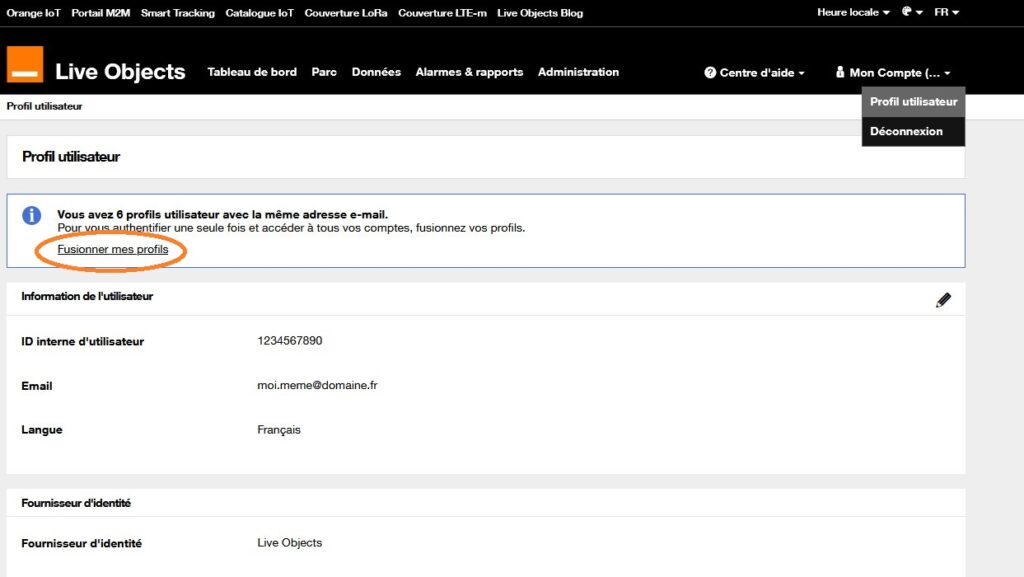
1) Log in and go to the User Profile page.

2) On the User Profile page, click on the “Merge My Profiles” link in the information banner below the text “You have x User profiles with the same email address”.
If the banner with the link does not display, it means either you have only one user profile associated with your email or you have already merged your profiles.
3) Check the email sent to the address associated with your profile to verify the list of user profiles to be merged.
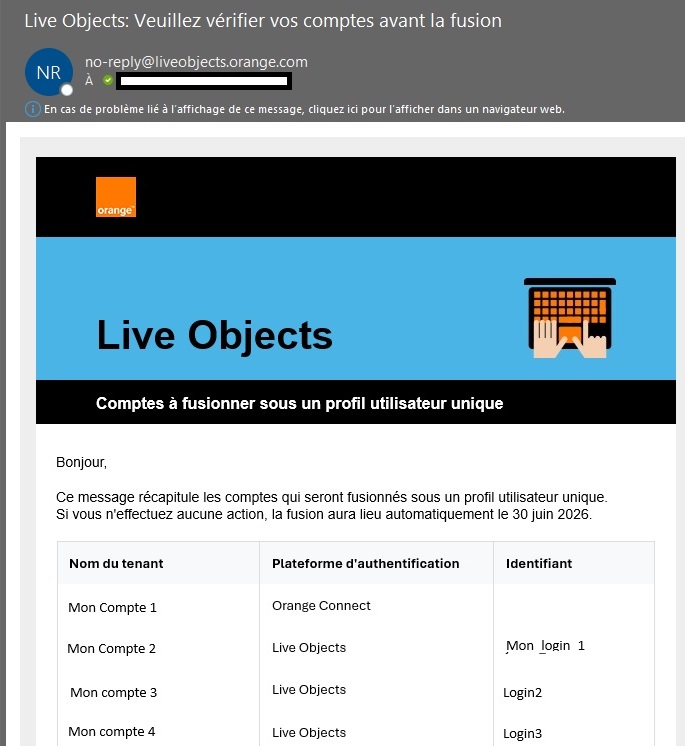
4) If the list is correct, click the “Proceed with Merge” button at the bottom of the email and follow the instructions displayed on the Live Objects portal.
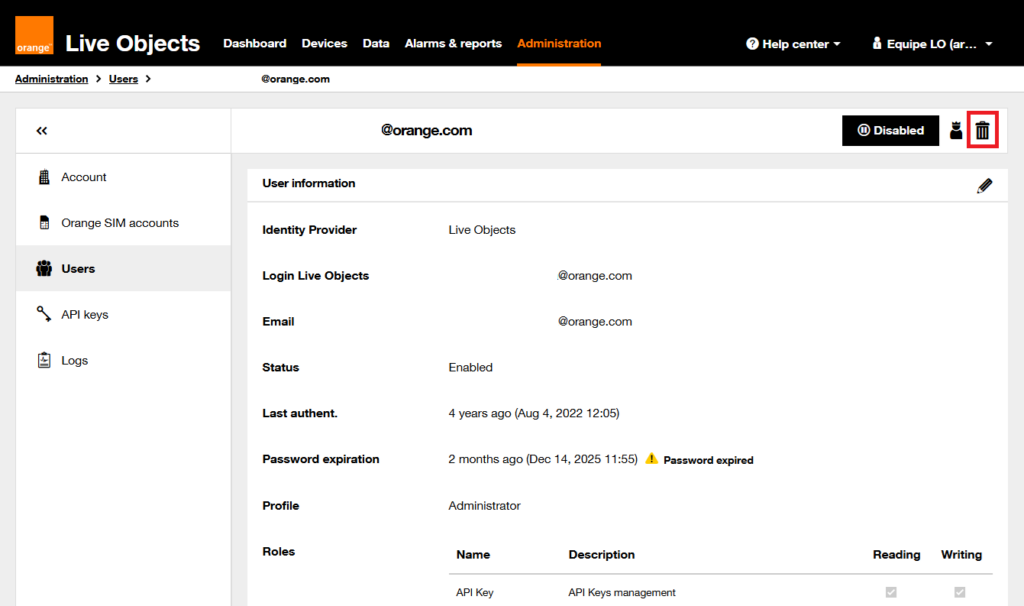
If you do not want to merge a profile listed, you can either modify the email address associated with the profile – if you want to keep it (see tutorial: How to change your email address in Live Objects) – or ask the account (or tenant) administrator to delete the user profile. Deletion can also be performed anytime after the merge.
If you encounter issues during the merge process, you can contact Live Objects technical support for assistance.
Preparatory Actions Before Merging Your Profiles
Depending on your situation, some preparatory steps may be necessary. Here are the different scenarios and recommended actions.
1) You use login/password credentials for applications to authenticate programmatically
Login/password authentication is intended solely for portal users. If you have created login/password credentials for applications accessing Live Objects via API, we recommend switching to API keys.
Action required: Replace login/password credentials used by these applications with API keys. Each application should have its own API key for each account it accesses. (see the API keys guide).
2) You have created a login/password associated with your email address and shared it with another person
Without action, this person will lose access to the Live Objects portal during the profile merge. The same applies if they only use the Live Objects Sensor mobile app.
Action required:
- Ask this person to replace the email address associated with their login/password with their own email address (see tutorial: How to change your email address in Live Objects).
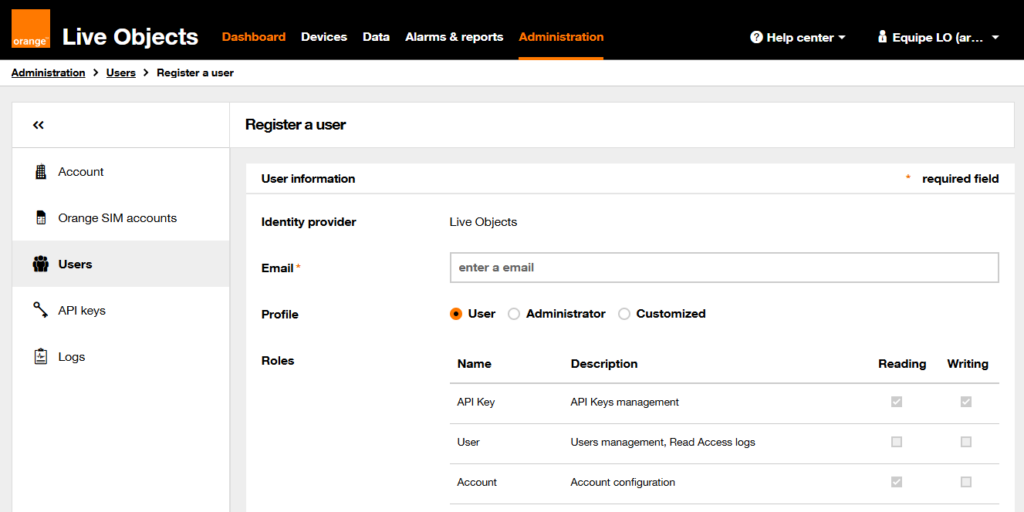
- Alternatively, in the Live Objects account administration menu, create a new user for this person with their email and delete the user associated with your email.
In all cases, it is strongly recommended for security reasons to restrict login credentials and email access to a single individual (see tutorial: How to verify which email address is associated with my login/password).
What Happens if You Do Not Merge Your Profiles?
All user profiles sharing the same email address will be automatically merged at the end of the first half of 2026.
How can I group or dissociate access to my user profile?
When merging your profiles, Live Objects automatically consolidates all profiles linked to the same email address. However, you may want to manually group or dissociate other access points.
To do so, simply change the email address of the relevant profiles. Please note that this operation is only possible if the profile is authenticated via Live Objects. If you connect through the ECE portal or Orange Romania, contact Live Objects technical support.
- Dissociating access: replace the profile’s email address with a different email than the one used during the initial merge setup.
- Grouping access: replace the profile’s email address with the email used during the initial merge.
How to change the email address on a user profile?
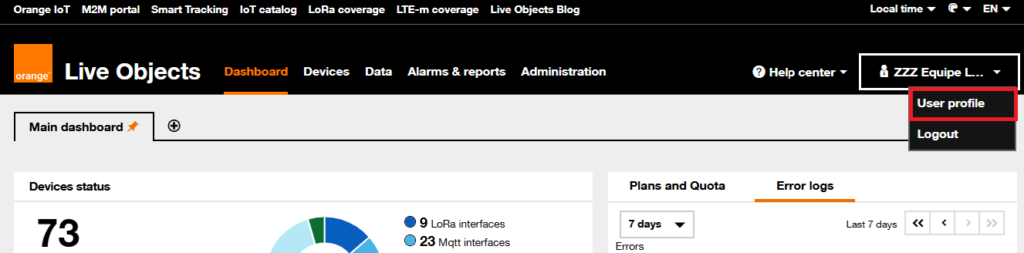
1) Go to your user profile:
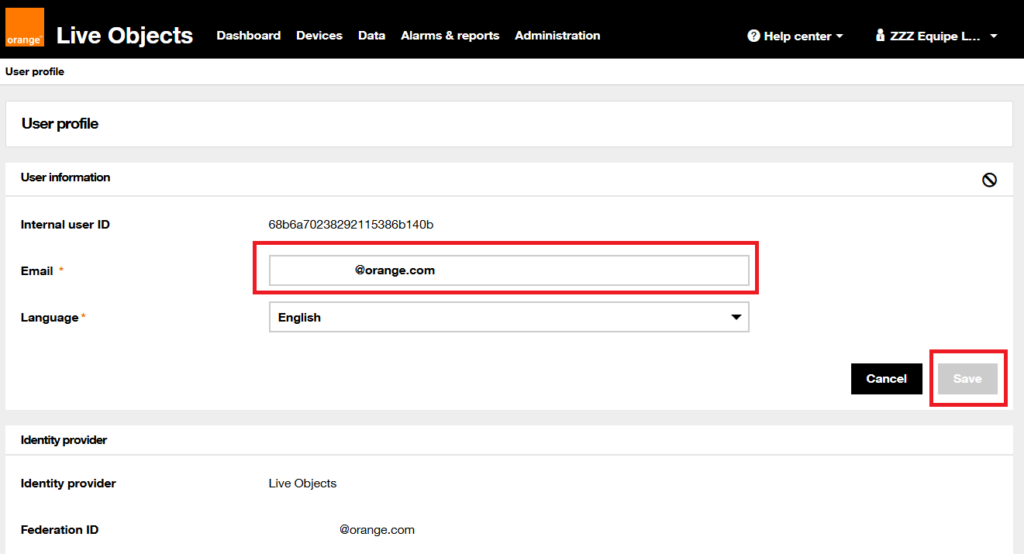
2) Edit your email address:
If you’ve already merged your user profiles, don’t worry: you can still group or dissociate access after the merge.
- Dissociate access: ask your Live Objects account administrator to remove your access.
- Add access: ask your Live Objects account administrator to add a new access with your profile’s email address.
Actions to take as soon as possible:
Depending on your situation, preparatory actions may be necessary. Here are the different cases and recommendations:
- 1) You access a single Live Objects account with one login/password.
No action needed! If your email address is not already used as a login on Live Objects, this change will be gradually implemented in H1 2026 during your password renewal. - 2) You have multiple login/passwords for different Live Objects accounts, reserved solely for your use.
If all your login/passwords are linked to the same email address, they will be merged during the first half of 2026. No preparation required other than waiting for the merge process.
Tutorial: How to verify which email address is associated with my Live Objects account?
Tutorial: How to update the email address associated with my Live Objects account? - 3) You use login/password for applications to authenticate programmatically.
Login/password authentication is intended only for portal users. If you have created login/password for applications accessing Live Objects via API, it will be forbidden in December 2025, you will have to switch to API keys.
Action required: Replace login/password with API keys. Each application should have its own API key for each account it accesses. (See the guide on API keys) - 4) You have created multiple login/passwords linked to your email and provided these credentials to persons who do not have an access to your mailbox.
Without action, these persons will lose access during the account merge. This also applies if they only use the Live Objects Sensor mobile app.
Action required:- Replace email addresses associated with these login/passwords with individual, nominative email addresses (e.g., martin.dupont@subcontractor-company.com).
Tutorial: How to update the email address associated with my Live Objects account? - Or create a new login/password for each third-party user on their own email and delete the previous shared access.
Tutorial: How to verify which email address is associated with my Live Objects account?
- Replace email addresses associated with these login/passwords with individual, nominative email addresses (e.g., martin.dupont@subcontractor-company.com).
And after ?
When the merge assistant will be released at the end of the first quarter of 2026, you will receive an email with instructions to proceed. The merge will be initiated by you via the Live Objects portal.
Once logged in with your merged credentials, you can easily switch between accounts via the menu at the top right of the interface.
Without action, all login/passwords sharing the same email address will be automatically merged by the end of the first half of 2026.
Towards enhanced security in 2026
As part of our commitment to security standards and regulations (such as the European NIS2 directive), we will gradually implement multi-factor authentication (MFA) for Live Objects users with administrative rights.
In France, Orange Business customers will see their portal access gradually migrated in 2026 to the Espace Client Entreprise SSO to enable strong authentication.
For more information on MFA for ECE, visit this page.
Need help?
Our team is available to answer your questions. Please contact us via our form.
Thank you for your trust and loyalty to Live Objects. Together, let’s continue building the future of IoT!

 B2B "IoT enthusiasts" group
 Live Objects on GitHub
 Tutorials
 Orange Business